Ping Logger to monitor when internet is down

Internet down in eero app

We have Ziply (formerly Frontier, formerly GTE) fiber at home and the other day I noticed that the internet wasn't reachable.  The eero app said the internet was down.
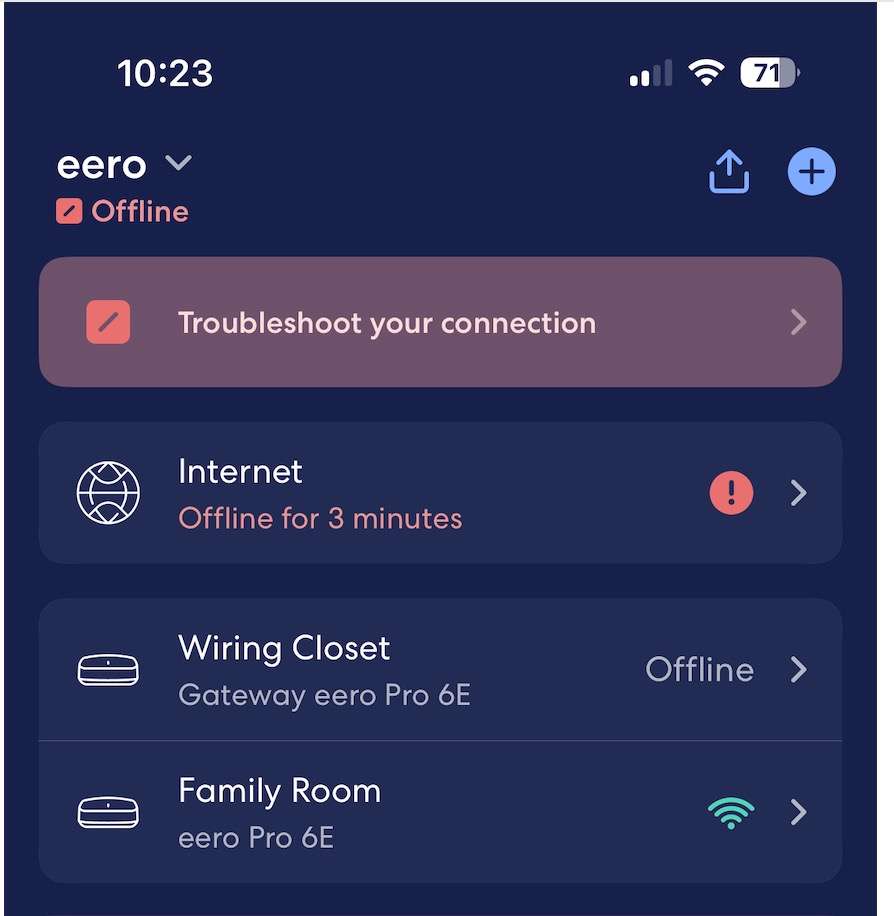
internet down in eero app
Internet down in eero app

 I checked the box (Optical Network Terminal) in the box and it showed green.

After another minute or so, the connection resumed.   

I don't know how often this happens so I decided to monitor the internet connection from a server that's running 24/7.

I found a simple script via Google that by default pinged Google's own nameserver 8.8.8.8 every 5 seconds.  The problem with it, for my purposes, is that I would have to remember to start it every time the machine restarted.   So I asked ChatGPT to make me a version that would launch on reboot.   One of the complicating things using scripts as a LaunchAgent is that MacOS is very protective of your home directory and it's difficult to write there.  ChatGPT suggests ~/Library/Logs as a safe place and it seems to be working great.

Here's the script:

#!/bin/bash

# Description: Monitor internet connectivity and log outages

# Usage: ./ping_logger.sh


SLEEP_SECONDS=5

FLAG_FILE="/tmp/ping_logger_ran"

HOST="8.8.8.8" # Ping Google's public DNS


# Ensure it only starts once per boot

if [ -f "$FLAG_FILE" ]; then

  exit 0

fi

touch "$FLAG_FILE"


# Log directory (safe for LaunchAgent)

LOG_DIR="$HOME/Library/Logs/ping_logger"

mkdir -p "$LOG_DIR"


while true; do

  # Create daily log filename

  LOG_FILE="$LOG_DIR/ping_$(date +%Y-%m-%d).log"


  # Timestamp

  NOW="$(date '+%Y-%m-%d %H:%M:%S')"


  # Run ping (single packet, 2s timeout)

  if ping -c 1 -W 2000 "$HOST" >/dev/null 2>&1; then

    RESULT="OK"

  else

    RESULT="FAIL"

  fi


  echo "$NOW  $RESULT" >> "$LOG_FILE"


  sleep "$SLEEP_SECONDS"

done

We also need to put a file in ~/Library/LaunchAgents.   ChatGPT suggested com.user.pinglogger.plist as a name and I went with that.     Start it by doing 

> launchctl load ~/Library/LaunchAgents/com.user.pinglogger.plist 

<?xml version="1.0" encoding="UTF-8"?>

<!DOCTYPE plist PUBLIC "-//Apple//DTD PLIST 1.0//EN"

"http://www.apple.com/DTDs/PropertyList-1.0.dtd">

<plist version="1.0">

  <dict>


    <key>Label</key>

    <string>com.user.pinglogger</string>


    <key>StandardErrorPath</key> <string>/tmp/pinglogger.err</string>

    <key>StandardOutPath</key> <string>/tmp/pinglogger.out</string>


    <key>ProgramArguments</key>

    <array>

      <string>/bin/bash</string>

      <string>/Users/kids/Maestral/scripts/ping_logger.sh</string>

    </array>


    <key>RunAtLoad</key>

    <true/>


    <!-- Prevent multiple instances -->

    <key>KeepAlive</key>

    <false/>


  </dict>

</plist>